iLogicによる設計の自動化などで作業効率化を図ります。
iLogic - 三面図一括配置
iLogicの目次
自動中心線
Inventorでは[注釈][記号][中心線]ビューを選択、もしくはビューを右クリックで[自動中心線]をクリックで中心線が作成されますが、このコードではすべてのビューで中心線を一括で作成します。
- 1.複数の設計ファイルで同じ自動化ルールを実行できるように外部ルールで作成します。
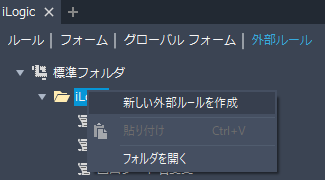
iLogicブラウザの外部ルールで追加したフォルダを右クリックして[新しい外部ルールを作成]をクリック。
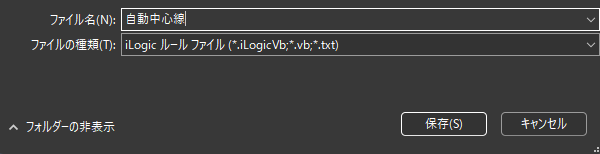
- 2.任意の名前を入力して[保存]をクリック。
- 3.下記コードを入力して[保存]をクリック。
Sub Main
    Dim oDoc As Inventor.DrawingDocument = Nothing
    Try
        oDoc = ThisDoc.Document
    Catch ex As Exception
        MessageBox.Show("図面キュメントでのみ実行できます。", "自動中心線")
        Exit Sub
    End Try

    Dim oDrawingView As Inventor.DrawingView
    Dim rslt As Inventor.ObjectsEnumerator
    Dim oAutomatedCenterlineSettings As Inventor.AutomatedCenterlineSettings = oDoc.DrawingSettings.AutomatedCenterlineSettings

    With oAutomatedCenterlineSettings
        .ApplyToBends = False
        .ApplyToCircularPatterns = False
        .ApplyToCylinders = True
        .ApplyToFillets = False
        .ApplyToHoles = True
        .ApplyToPunches = True
        .ApplyToRectangularPatterns = False
        .ApplyToRevolutions = True
        .ApplyToSketches = True
        .ApplyToWorkFeatures = False
        .ProjectionNormalAxis = True
        .ProjectionParallelAxis = True
    End With

    For Each oDrawingView In oDoc.ActiveSheet.DrawingViews
        rslt = oDrawingView.SetAutomatedCenterlineSettings(oAutomatedCenterlineSettings)
		    Next
End Sub
作成した外部ルールをリボンやショートカットに登録しておくと便利です。 - 4.
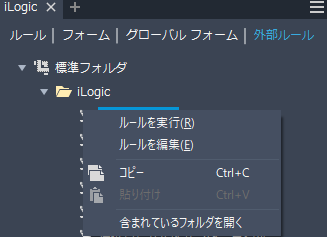
作成したルールを右クリックして[ルールを実行]をクリックするとすべてのビューで中心線を一括で作成されます。